

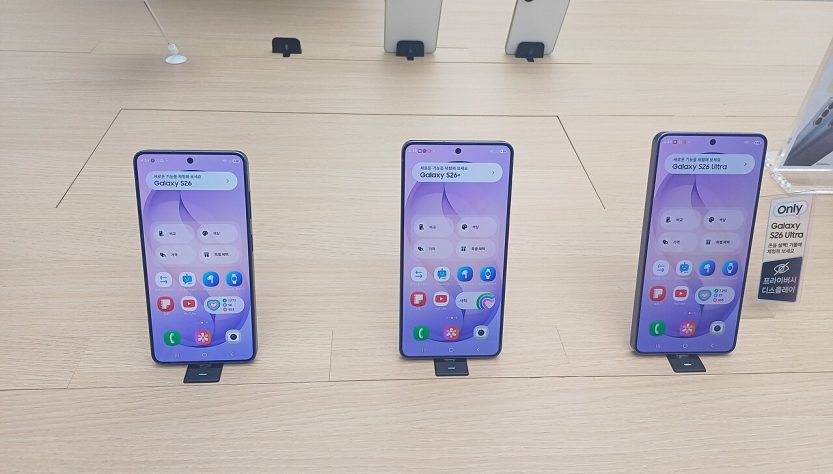
One UI 9 rollout is here, and Galaxy S26 users are among the first to experience its new features. This update promises to enhance user experience significantly.
What is One UI 9?
One UI 9 is the latest iteration of Samsung’s custom user interface designed for its Galaxy devices. This update aims to enhance user experience, offering a more intuitive and polished environment for Galaxy S26 users. With the One UI 9 rollout, Samsung focuses on performance improvements and new features that cater to the needs of modern smartphone users.
The update brings several noteworthy enhancements, including:
- Improved Customization: Users can expect more options for personalizing their devices, allowing for a truly unique experience.
- Enhanced Performance: Optimizations in the system ensure smoother transitions and faster app launches, making daily tasks more efficient.
- New Features: One UI 9 introduces innovative tools that leverage AI, such as an improved camera interface and smarter app suggestions.
- Better Privacy Controls: Users will find enhanced security settings that provide greater control over their personal information.
The One UI 9 rollout represents Samsung’s commitment to keeping its devices up-to-date with the latest technology trends, ensuring that Galaxy S26 users enjoy a cutting-edge mobile experience. As more devices receive the update, the excitement surrounding One UI 9 continues to grow.
Key Features of One UI 9
The One UI 9 rollout brings a host of exciting features to enhance the user experience for Galaxy S26 users. Among the standout additions are:
- Revamped User Interface: The new design focuses on simplicity and ease of use, offering a more intuitive navigation experience.
- Enhanced Customization: Users can now personalize their home screen and app layouts with more options, ensuring a unique look and feel.
- Improved Performance: Optimizations under the hood lead to faster app launches and smoother multitasking, making daily tasks effortless.
- Advanced Privacy Features: One UI 9 introduces stronger privacy controls, allowing users to manage app permissions more effectively.
- New Widgets: A variety of stylish widgets have been added, providing quick access to essential information without navigating through multiple screens.
- AI-Powered Suggestions: The update includes smart recommendations based on user behavior, streamlining tasks and enhancing productivity.
With these features, the One UI 9 rollout is set to redefine the Galaxy S26 experience, positioning it as one of the most significant updates in recent years.
How to Update to One UI 9
Updating your Galaxy S26 to One UI 9 is a straightforward process. To ensure a smooth transition, follow these steps:
- Connect to Wi-Fi: Before starting, make sure your device is connected to a stable Wi-Fi network to avoid interruptions during the download.
- Check for Updates: Go to Settings > Software update > Download and install. Your device will check for the latest updates available.
- Download One UI 9: If the update is available, you will see the option to download it. Tap Download and wait for the file to download completely.
- Install the Update: Once the download is complete, tap Install. Your device will restart, and the installation process will begin. This may take several minutes.
- Complete the Setup: After installation, your device may prompt you to complete a few setup steps. Follow the on-screen instructions to finalize the update.
By following these simple steps, you can enjoy the enhanced features and improvements that the One UI 9 rollout brings to your Galaxy S26.
User Reactions to One UI 9
User reactions to the One UI 9 rollout have been largely positive, with many Galaxy S26 users expressing their excitement about the new features and improvements. On various social media platforms, users have taken to sharing their experiences since the update was released.
Many users appreciate the enhanced customization options, which allow for a more personalized interface. Key highlights from user feedback include:
- Improved Performance: Several users noted that their devices feel faster and more responsive after the update.
- Visual Enhancements: The updated design elements and smoother animations have been particularly well-received.
- New Features: Users are enjoying the new widgets and tools that facilitate easier multitasking.
- Battery Life: Some users have reported better battery management, leading to longer usage times.
However, not all feedback has been positive. A small number of users have encountered bugs or issues post-update, prompting discussions on forums about potential fixes. Overall, the reception of the One UI 9 rollout reflects a strong enthusiasm among the Galaxy S26 community, indicating that many view this update as a significant step forward for their devices.
Comparing One UI 9 and Previous Versions
As the One UI 9 rollout progresses, many users are curious about how it compares to previous versions of Samsung’s user interface. Each iteration of One UI has introduced significant enhancements and optimizations, making it essential to assess the improvements offered in this latest update.
One UI 9 builds upon the foundation laid by its predecessors, focusing on delivering a more streamlined and user-friendly experience. Here are some key comparisons:
- Performance: One UI 9 is optimized for better resource management, resulting in snappier app launches compared to One UI 8.
- Customization: While One UI 8 offered various themes and options, One UI 9 enhances this with even more personalization features, allowing users to tweak their devices to their liking.
- Privacy and Security: One UI 9 introduces improved privacy controls, building on what was available in earlier versions and ensuring users have more control over their data.
- Visuals: The aesthetics of One UI 9 have been refined, providing a fresher look and feel that many users find appealing compared to earlier designs.
In conclusion, the One UI 9 rollout appears to be a significant advancement, making it a compelling option for Galaxy S26 owners considering an upgrade.
Potential Issues with One UI 9
While the One UI 9 rollout has brought many exciting features to the Galaxy S26, users may experience some potential issues that could affect their overall satisfaction with the update. Here are a few concerns that have been raised:
- Performance Glitches: Some users have reported occasional lag and app crashes after updating to One UI 9, which can hinder productivity and user experience.
- Battery Drain: A significant number of Galaxy S26 owners have noted increased battery consumption since the upgrade. This might be due to new background processes associated with the update.
- Compatibility Problems: Certain third-party applications may not yet be optimized for One UI 9, leading to functionality issues or unexpected behavior.
- UI Changes: While many appreciate the revamped interface, some users have expressed frustration with the learning curve associated with the new layout and features.
- Slow Rollout: Not all users have received the update simultaneously, causing frustration among those who are eager to experience One UI 9’s enhancements.
As the One UI 9 rollout continues, it remains to be seen how Samsung addresses these concerns in future updates.
Future Updates for Galaxy S26
As Samsung continues its commitment to enhancing user experience, future updates for the Galaxy S26 are highly anticipated. Following the recent One UI 9 rollout, users are eager to see what additional improvements and features may be on the horizon.
Samsung has a history of providing regular software updates, and the Galaxy S26 is likely to benefit from this trend. Future updates may include:
- Performance Enhancements: Optimizations that could boost the device’s speed and efficiency.
- New Features: Additional functionalities that enhance usability, such as improved multitasking capabilities.
- Security Patches: Ongoing updates to protect user data and maintain device integrity.
- Camera Improvements: Updates aimed at refining photo and video quality, keeping pace with evolving photography standards.
Moreover, users can expect Samsung’s regular feedback loop to continue, ensuring that updates are shaped by real-world usage and concerns. As the One UI 9 rollout unfolds, Samsung’s commitment to refining the Galaxy S26 will likely remain a key focus for future software iterations, making this device a competitive choice for consumers.
Conclusion on One UI 9 Rollout
In conclusion, the One UI 9 rollout marks a significant milestone for Galaxy S26 users, showcasing Samsung’s commitment to enhancing the user experience. While the update introduces a suite of advanced features and improvements, the overall reception has been largely positive, with many users praising the interface’s fluidity and customization options.
However, as with any major software update, some potential issues have been reported. Users have noted occasional bugs and performance hiccups, which Samsung is likely to address in future patches. It is essential for users to stay updated on these fixes as they continue to explore One UI 9.
Looking ahead, the future updates for Galaxy S26 promise to refine the One UI 9 experience further. Samsung has a history of supporting its devices with regular updates, and this trend is expected to continue, ensuring that users can benefit from ongoing enhancements.
Ultimately, the One UI 9 rollout could be seen as one of the best updates for the Galaxy S26, especially for those eager to take advantage of the latest features. As the software matures, it will be interesting to see how user feedback influences subsequent updates and the overall trajectory of Samsung’s software offerings.
via Wikimedia Commons