

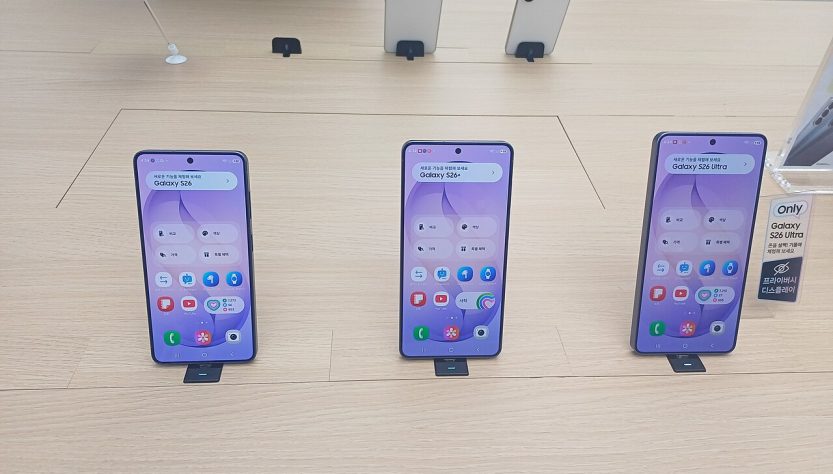
Samsung Galaxy S26 update is here, delivering the stable One UI 9 to users. This update promises a range of new features and improvements that enhance the user experience.
What’s New in One UI 9?
The latest update for the Samsung Galaxy S26 brings exciting enhancements with One UI 9, offering users a more streamlined and efficient experience. This update focuses on improving user interaction and overall device performance.
One of the standout features in One UI 9 is the improved home screen customization. Users can now easily rearrange widgets and app icons, making it simpler to personalize their device. Additionally, the update introduces dynamic theming options that adapt based on the wallpaper, providing a fresh look to the interface.
Another significant improvement is the enhanced multitasking capabilities. With the updated split-screen view, users can now run two apps side by side more efficiently, allowing for better productivity. The quick settings menu has also been redesigned for easier access to essential features, making navigation much smoother.
Performance-wise, One UI 9 optimizes battery usage, ensuring that the Samsung Galaxy S26 can last longer on a single charge. The update also focuses on security, with enhanced privacy features that give users more control over their data.
Overall, the One UI 9 update on the Samsung Galaxy S26 delivers clear benefits, making it a worthy upgrade for those looking to enhance their mobile experience.
User Experience Improvements
The latest Samsung Galaxy S26 update brings a host of user experience improvements that are designed to elevate the overall functionality and aesthetic appeal of the device. One UI 9 enhances the interaction between users and their smartphones, making everyday tasks more intuitive and enjoyable.
One of the standout features of the update is the refined interface, which boasts a cleaner design that allows for easier navigation. Users will appreciate the following enhancements:
- Improved Dark Mode: The Dark Mode has been optimized, providing a more comfortable viewing experience in low-light conditions and helping to conserve battery life.
- Enhanced Widgets: Widgets have been redesigned to offer more information at a glance while maintaining an aesthetically pleasing look on the home screen.
- Faster App Launch: The update significantly reduces app launch times, enabling users to access their favorite applications more swiftly.
- Refined Notifications: Notifications are now more organized and can be easily managed, ensuring that users never miss important alerts.
Overall, the Samsung Galaxy S26 update to One UI 9 not only improves the visual appeal but also enhances functionality, making the user experience smoother and more enjoyable. With these updates, users can expect their devices to perform better than ever before.
How to Update Your Galaxy S26
Updating your Samsung Galaxy S26 to the latest software version is a straightforward process. Here’s a step-by-step guide to ensure you get the most out of the new features offered by the One UI 9 update.
First, make sure your device is connected to a stable Wi-Fi network. This will help avoid any interruptions during the download process and save your mobile data. Next, follow these steps:
- Open the Settings app on your Galaxy S26.
- Scroll down and select Software update.
- Tap on Download and install. Your device will check for available updates.
- If the One UI 9 update is available, follow the on-screen prompts to download and install it.
It’s essential to ensure your device has enough battery life before starting the update. Ideally, your Galaxy S26 should be charged to at least 50% to prevent any power-related issues during the installation.
After installing the update, your device will restart automatically. Once it boots up, you can explore the new features and enhancements that come with One UI 9, which significantly improves user experience.
Keep your device updated regularly to enjoy the latest features and security enhancements, ensuring that your Samsung Galaxy S26 operates at its best.
Common Issues with the Update
The recent update for the Samsung Galaxy S26, which features One UI 9, has generated excitement among users. However, it has also led to some common issues that users have reported since its rollout.
Many users have expressed concerns about battery performance after installing the update. Some have noticed a significant drain, which raises questions about the optimization of the new software. In addition, connectivity problems have emerged, particularly with Wi-Fi and Bluetooth connections dropping unexpectedly, causing frustration for those relying on these features for daily tasks.
Another issue that has been frequently mentioned is related to app compatibility. Certain third-party applications appear to be crashing or running slower than before, creating interruptions in user experience. This has been particularly evident for apps that require intensive processing or real-time data.
Furthermore, some users have reported that the camera features are not performing as expected. Issues such as lag during photo capture and problems with the autofocus have been noted, leading to disappointment among photography enthusiasts.
Despite these challenges, Samsung is actively working to address these matters in upcoming patches. For users of the Galaxy S26, staying informed about updates and fixes will be crucial to ensure a smooth experience with One UI 9.
Future Updates for Samsung Devices
The Samsung Galaxy S26 update is just the beginning of an exciting journey for users of Samsung devices. As technology evolves, so does Samsung’s commitment to enhancing the user experience through regular updates. Future updates are anticipated to bring even more features, performance enhancements, and security improvements.
Samsung has a history of providing timely updates across its range of devices, ensuring that even older models benefit from the latest software innovations. Users can expect:
- Enhanced security: Regular updates will include patches that keep devices secure from emerging threats.
- New features: Samsung often introduces new functionalities that enhance usability and performance, making it easier for users to interact with their devices.
- Bug fixes: Each update aims to resolve any issues reported by users, leading to a smoother experience overall.
- Improved optimization: Future updates will likely refine app performance and battery management, maximizing efficiency.
With the launch of the Samsung Galaxy S26 update, users can look forward to a more refined experience as Samsung continues to roll out updates that not only meet but exceed expectations. Whether it’s through One UI 9 or subsequent versions, staying updated is essential for unlocking the full potential of your Samsung device.
The Samsung Galaxy S26 update brings a host of new features that enhance user experience significantly. With the Samsung Galaxy S26 update, users can expect improved performance and a more intuitive interface with One UI 9.
via Wikimedia Commons